
The "Product Review Reminder" module allows you to automate the process of collecting reviews from customers after they make a purchase. With this tool, you can configure automatic reminder emails and SMS notifications that are sent to customers a certain time after an order is placed. This encourages buyers to share their experience, which helps increase trust in the store and contributes to sales growth.
The module offers flexible settings that allow you to choose the reminder sending frequency, filter orders by status, and configure the appearance and text of the message. You can use variables "Shortcodes" to personalize emails by automatically inserting the customer's name, order number, purchased products, and other data.
In addition, the module includes a statistics section that stores the history of all sent reminders with their corresponding statuses. This helps track exactly who received the notification and detect and fix possible sending errors in time.
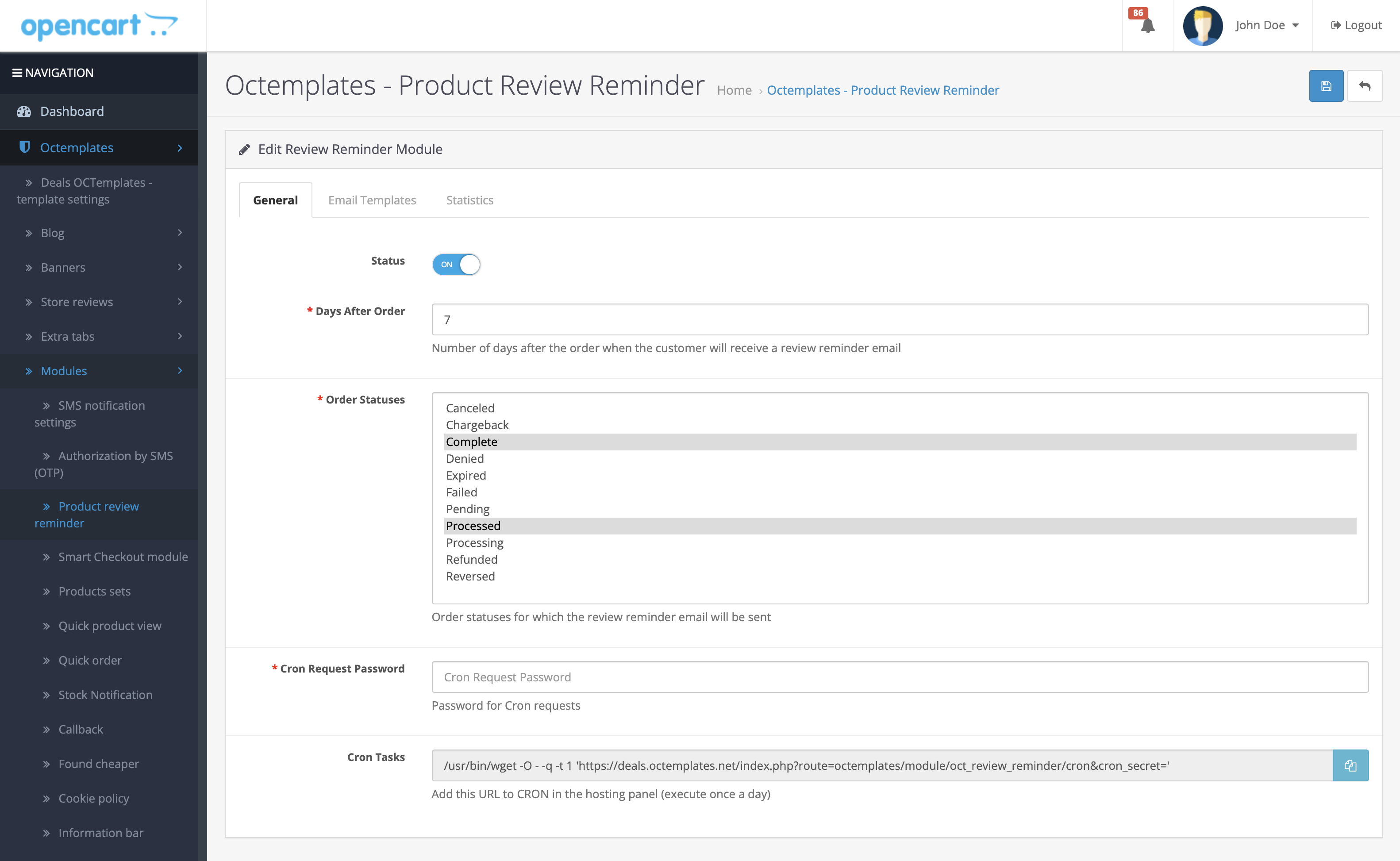
Three tabs are available in the module settings.
The "General" tab contains the following settings:
-
"Status" — enables or disables the module. If set to "ON", the module is activated and reminders will be sent to customers.
-
"Number of days after order" — specifies how many days after placing an order the customer will receive an email reminder to leave a review for the purchased product. The value can be changed according to your needs. The default value is 10 days.
-
"Order statuses" — allows you to select the order statuses for which a review reminder will be sent. For example, you can exclude statuses such as "Canceled", "Returned", and so on, so that reminders are sent only for completed or fulfilled orders.
-
"Password for Cron requests" — attention! For the module to work, you must enter a security key "Password" to protect Cron requests. This ensures security when automatic requests are executed.
-
"Cron task" — provides a special link for configuring automatic reminder execution via Cron. After saving the password, this link must be added in the hosting control panel in the Cron settings section "Usually configured to run daily".
Example: /usr/bin/wget -O - -q -t 1 'https://deals.octemplates.net/index.php?route=octemplates/module/oct_review_reminder/cron&cron_secret=secretKey'
This Cron request runs the module script to send reminders according to the selected settings. If you process 150 or more orders per day, configure the Cron task to run more often, for example 2-3 times per day.
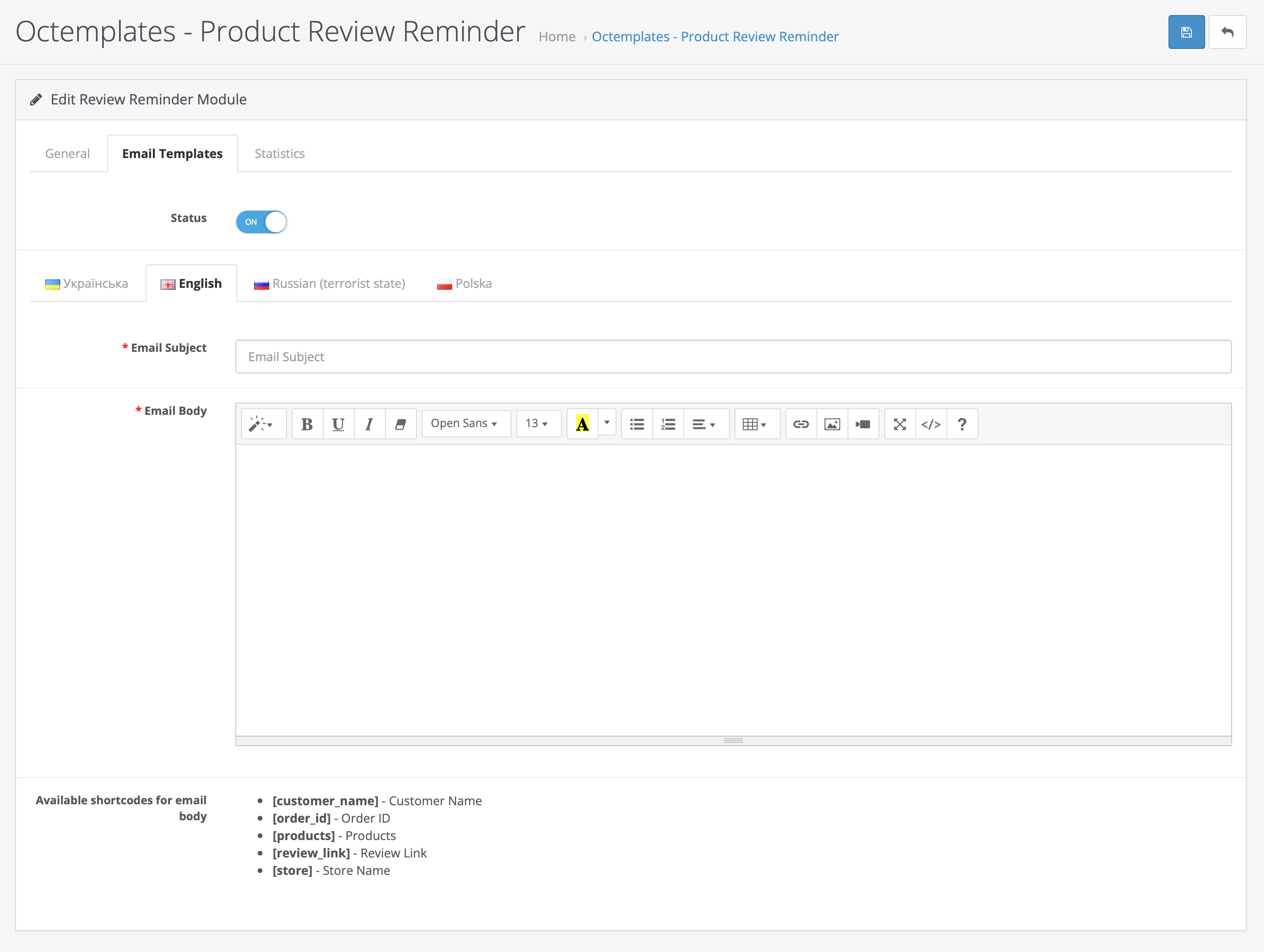
The following options are available in the "Email template settings" tab:
-
"Status" — enables or disables the email text editor. If the status is "ON", the field is available for editing the text.
-
"Languages" — multilingual support. It is possible to configure the template for different languages, allowing emails to be sent to customers in their language.
-
"Email subject" — field for entering the reminder email subject. For example: "Share your feedback about your order".
-
"Email body" — the main text of the reminder email that customers will receive. Special variables "Shortcodes" are available in the text and automatically insert the required data:
[customer_name]— customer name.[order_id]— order number.[products]— list of products from the order.[review_link]— link for leaving a review.[store]— store name.
Example email text:
Hello, [customer_name]!
We hope you liked the products you ordered in order #[order_id].
We would be very grateful if you could take the time to leave a review for the products:
[products]To leave a review, follow this link: [review_link]
Best regards, the [store] store administration
Thank you for your attention and have a nice day!
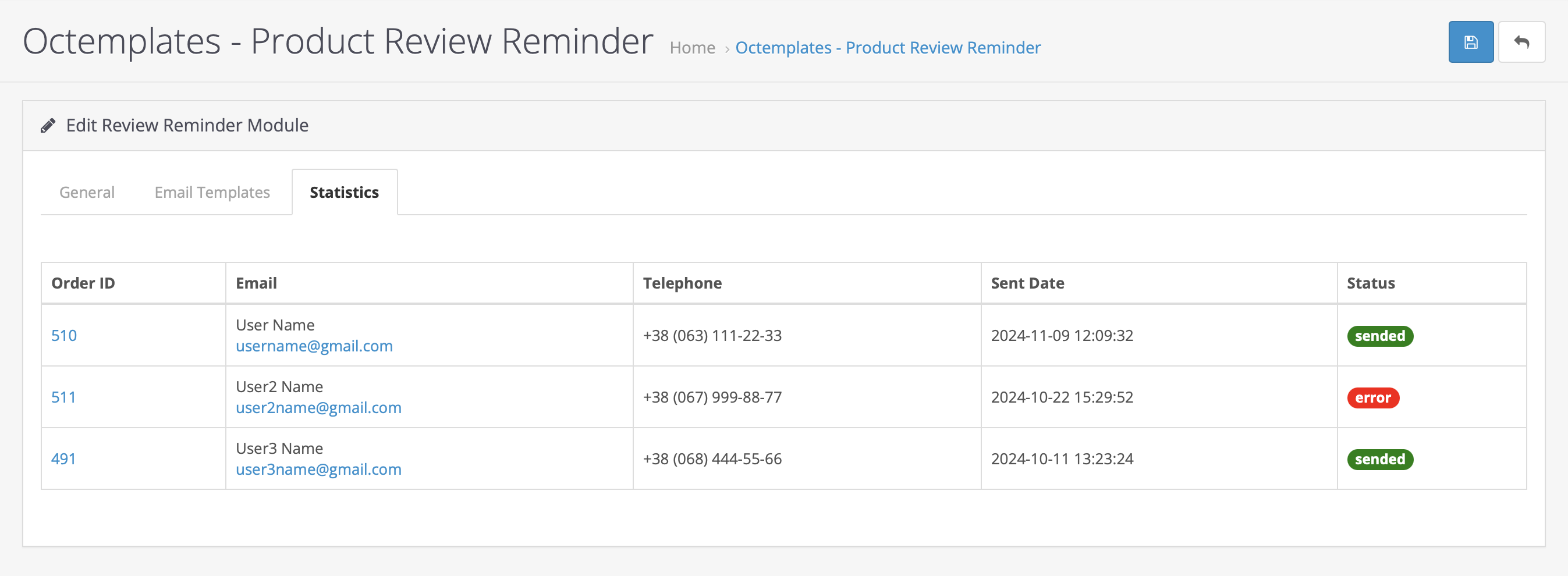
The "Review reminder sending statistics" tab displays statistics for sending reminder emails to customers in order to receive product reviews. The information is presented as a table with the following fields:
-
"Order ID" — the order identifier for which the reminder was sent. The number is clickable, allowing you to quickly go to detailed information about the corresponding order.
-
"Email" — the customer's name and email address to which the reminder was sent.
-
"Phone" — the customer's contact phone number, which can be useful for additional contact with the customer if necessary.
-
"Sending date" — the date and time when the reminder email was sent. This allows you to track the exact time the message was sent.
-
"Status" — displays the email sending status:
- sended "Green" — the email was sent successfully.
- error "Red" — an error occurred while sending the email. Server settings may need to be checked or the email may need to be sent again.
Write a comment